





I've been searching for some new mouse cursors for windows for years now. I've been using the same o D Yungas ones for a decade now, and want to try something new. The problem is, unlike the old days, customizing the look and feel of Windows is not a big deal to most anymore. So new skins and cursors that are actually decent rarely are created anymore. You can download the D Yungas Cursor pack here.
[caption id="attachment_10006475" align="alignnone" width="300"] My Comment on the D Yungas cursors. Damn, i have been using them for over a decade :oÞ[/caption]
[caption id="attachment_10006470" align="alignnone" width="300"]
My Comment on the D Yungas cursors. Damn, i have been using them for over a decade :oÞ[/caption]
[caption id="attachment_10006470" align="alignnone" width="300"]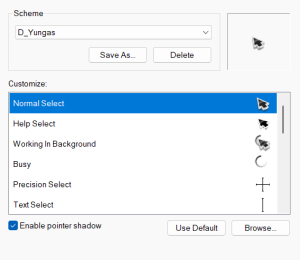 D Yungus Cursor[/caption]
After searching, and searching, I finally found some mouse Cursors that are different, yet really nice looking. Also, they are basic .cur files, so you don't need a special program like CursorXP to use them, they just work on any modern version of Windows.
They are called "Gami" because they're meant to look like origami. I admit the idea does sound stupid, but they do look really nice. The colors and animations are really good.
I've been using them for a while now, and thought that I should share.
D Yungus Cursor[/caption]
After searching, and searching, I finally found some mouse Cursors that are different, yet really nice looking. Also, they are basic .cur files, so you don't need a special program like CursorXP to use them, they just work on any modern version of Windows.
They are called "Gami" because they're meant to look like origami. I admit the idea does sound stupid, but they do look really nice. The colors and animations are really good.
I've been using them for a while now, and thought that I should share.
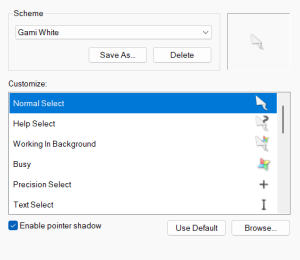 You can download them from DeviantArt here: https://www.deviantart.com/raylark/art/Gami-926173327
The set comes in 3 sizes: 32px, 48px, 64px.
From the page:
Description
The goal of this cursor was to see if I could make a convincing origami cursor. I think it's still rough, but some of the ideas worked out really well.
Compatibility
- Windows 7, 8, 10, 11
What You Get
- 15 .cur files (each can scale to 32px, 48px, 64px)
- 2 .ani (animated) files (for each size: 32px, 48px, 64px)
- install.inf
- readme.txt
How to Install
1. Download and extract [cursor].zip
2. Open the extracted folder
3. Right click "~install.inf" file
4. Click "install"
5. Navigate to Settings > Devices > Mouse > Additional Mouse Options > Pointers
6. Select the desired Scheme from drop down menu
7. Hit "OK"
I'm really enjoying them.
[caption id="attachment_10006469" align="alignnone" width="543"]
You can download them from DeviantArt here: https://www.deviantart.com/raylark/art/Gami-926173327
The set comes in 3 sizes: 32px, 48px, 64px.
From the page:
Description
The goal of this cursor was to see if I could make a convincing origami cursor. I think it's still rough, but some of the ideas worked out really well.
Compatibility
- Windows 7, 8, 10, 11
What You Get
- 15 .cur files (each can scale to 32px, 48px, 64px)
- 2 .ani (animated) files (for each size: 32px, 48px, 64px)
- install.inf
- readme.txt
How to Install
1. Download and extract [cursor].zip
2. Open the extracted folder
3. Right click "~install.inf" file
4. Click "install"
5. Navigate to Settings > Devices > Mouse > Additional Mouse Options > Pointers
6. Select the desired Scheme from drop down menu
7. Hit "OK"
I'm really enjoying them.
[caption id="attachment_10006469" align="alignnone" width="543"]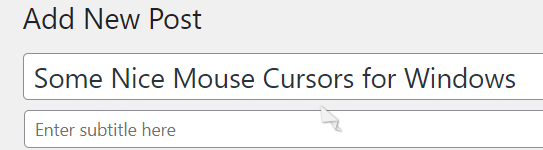 Using cursor while composing this post. tee hee.[/caption]
 My Comment on the D Yungas cursors. Damn, i have been using them for over a decade :oÞ[/caption]
[caption id="attachment_10006470" align="alignnone" width="300"]
My Comment on the D Yungas cursors. Damn, i have been using them for over a decade :oÞ[/caption]
[caption id="attachment_10006470" align="alignnone" width="300"]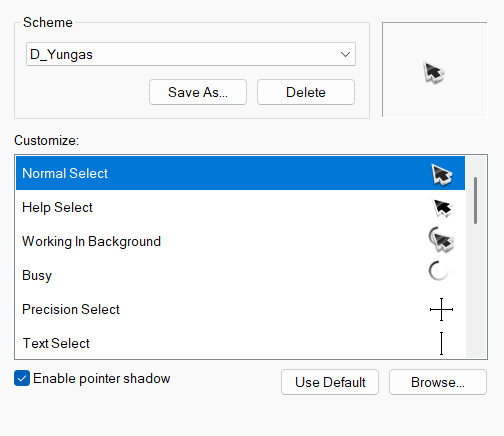 D Yungus Cursor[/caption]
After searching, and searching, I finally found some mouse Cursors that are different, yet really nice looking. Also, they are basic .cur files, so you don't need a special program like CursorXP to use them, they just work on any modern version of Windows.
They are called "Gami" because they're meant to look like origami. I admit the idea does sound stupid, but they do look really nice. The colors and animations are really good.
I've been using them for a while now, and thought that I should share.
D Yungus Cursor[/caption]
After searching, and searching, I finally found some mouse Cursors that are different, yet really nice looking. Also, they are basic .cur files, so you don't need a special program like CursorXP to use them, they just work on any modern version of Windows.
They are called "Gami" because they're meant to look like origami. I admit the idea does sound stupid, but they do look really nice. The colors and animations are really good.
I've been using them for a while now, and thought that I should share.
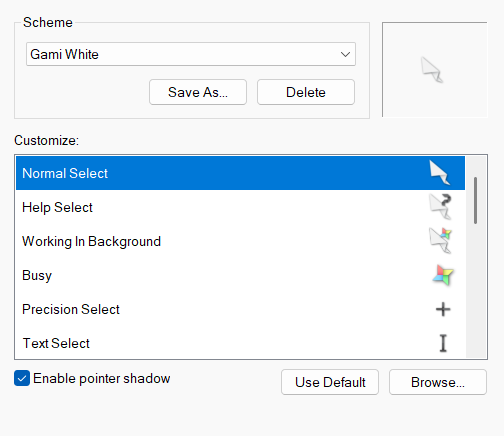 You can download them from DeviantArt here: https://www.deviantart.com/raylark/art/Gami-926173327
The set comes in 3 sizes: 32px, 48px, 64px.
From the page:
Description
The goal of this cursor was to see if I could make a convincing origami cursor. I think it's still rough, but some of the ideas worked out really well.
Compatibility
- Windows 7, 8, 10, 11
What You Get
- 15 .cur files (each can scale to 32px, 48px, 64px)
- 2 .ani (animated) files (for each size: 32px, 48px, 64px)
- install.inf
- readme.txt
How to Install
1. Download and extract [cursor].zip
2. Open the extracted folder
3. Right click "~install.inf" file
4. Click "install"
5. Navigate to Settings > Devices > Mouse > Additional Mouse Options > Pointers
6. Select the desired Scheme from drop down menu
7. Hit "OK"
I'm really enjoying them.
[caption id="attachment_10006469" align="alignnone" width="543"] Using cursor while composing this post. tee hee.[/caption]
You can download them from DeviantArt here: https://www.deviantart.com/raylark/art/Gami-926173327
The set comes in 3 sizes: 32px, 48px, 64px.
From the page:
Description
The goal of this cursor was to see if I could make a convincing origami cursor. I think it's still rough, but some of the ideas worked out really well.
Compatibility
- Windows 7, 8, 10, 11
What You Get
- 15 .cur files (each can scale to 32px, 48px, 64px)
- 2 .ani (animated) files (for each size: 32px, 48px, 64px)
- install.inf
- readme.txt
How to Install
1. Download and extract [cursor].zip
2. Open the extracted folder
3. Right click "~install.inf" file
4. Click "install"
5. Navigate to Settings > Devices > Mouse > Additional Mouse Options > Pointers
6. Select the desired Scheme from drop down menu
7. Hit "OK"
I'm really enjoying them.
[caption id="attachment_10006469" align="alignnone" width="543"] Using cursor while composing this post. tee hee.[/caption]
Recommended Comments